FLASHTRACE

Gran Turismo 7 · PS5 · Windows & Android

In development

Every lap.
Every channel.
Traced.

FlashTRACE reads the live telemetry Gran Turismo 7 sends from your PS5 and turns it into a race engineer's console. Watch your delta to your best while you drive, then lay any lap over another and see exactly where the time went.

Δ to best · Lap 2
−0.817
0:52.350
PRED 1:30.460

Speed · vs distance · Road Atlanta

Lap 7 · 1:32.745Lap 2 · 1:31.277 (ref)
S1S2S3
Sample rate
60Hz

Every packet the game sends

Channels
160+

Received, built-in and your own

Track layouts
113

Recognised from the line you drive

Cars
590

Named, from the game's car ID

Live

Know if you're up before the line.

The Live screen is built to be read at a glance on a second screen or a phone beside the wheel. A big running delta tells you whether this lap is faster than your best, and the predicted lap time tells you by how much.

  • Running delta to your best on this car and track, matched by where you are on the circuit, not just the distance
  • Tap the delta to race against your session best, or pick any lap you've logged
  • Shift lights from the game's own rev range, flashing on the limiter
  • Speed, gear, rpm, pedals and tyre temperatures, plus fuel, water and oil, position and driver aids
  • This lap's speed trace drawn over the reference lap, with a mini map of where you are
  • Full-screen mode on phones, and the screen stays on while you drive
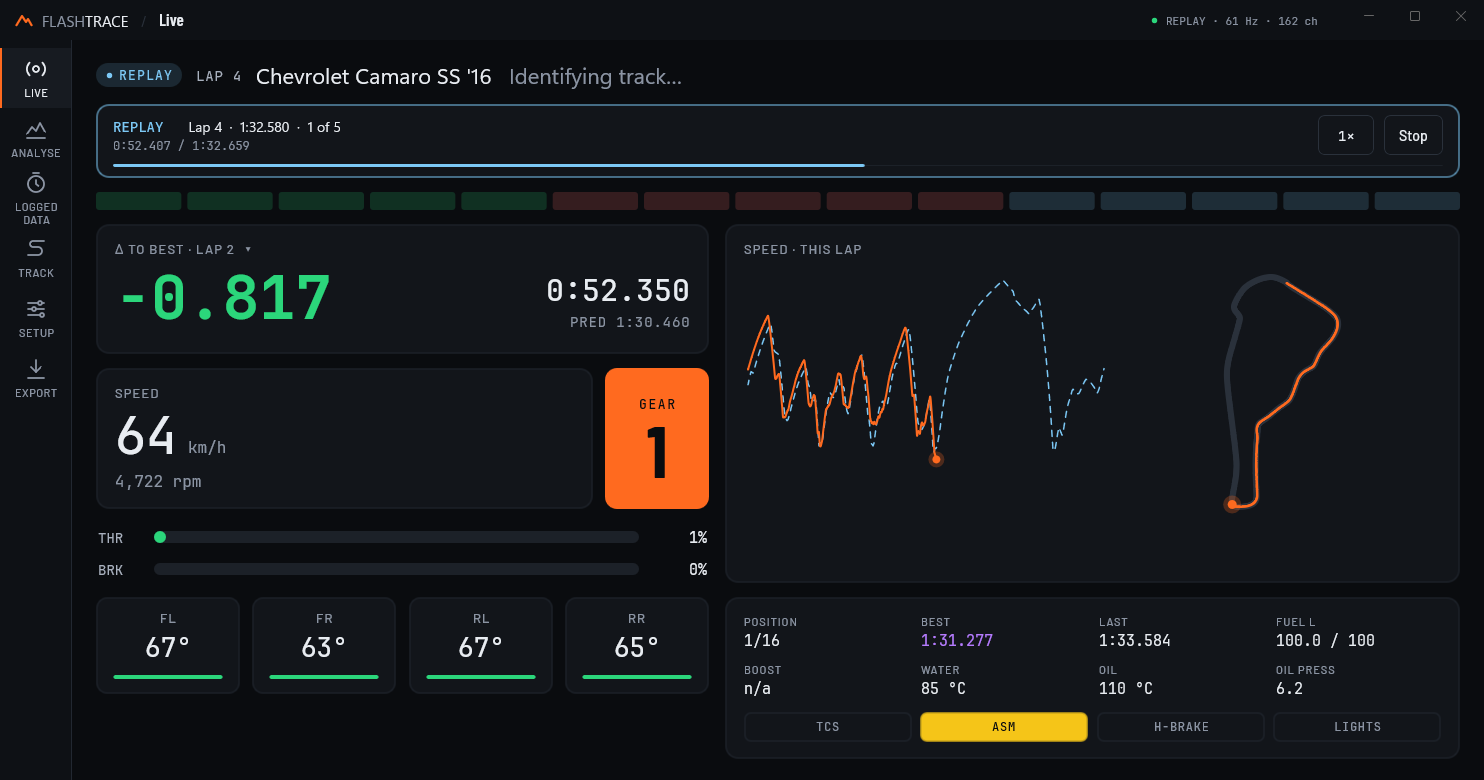
The Live screen during a lap of Road Atlanta in a Chevrolet Camaro SS: delta to best of minus 0.817 seconds, running time 52.350 seconds, predicted lap 1:30.460, 64 km/h in first gear, the speed trace over a dashed reference lap, a track map, tyre temperatures and car data.

Analyse

See exactly where the time went.

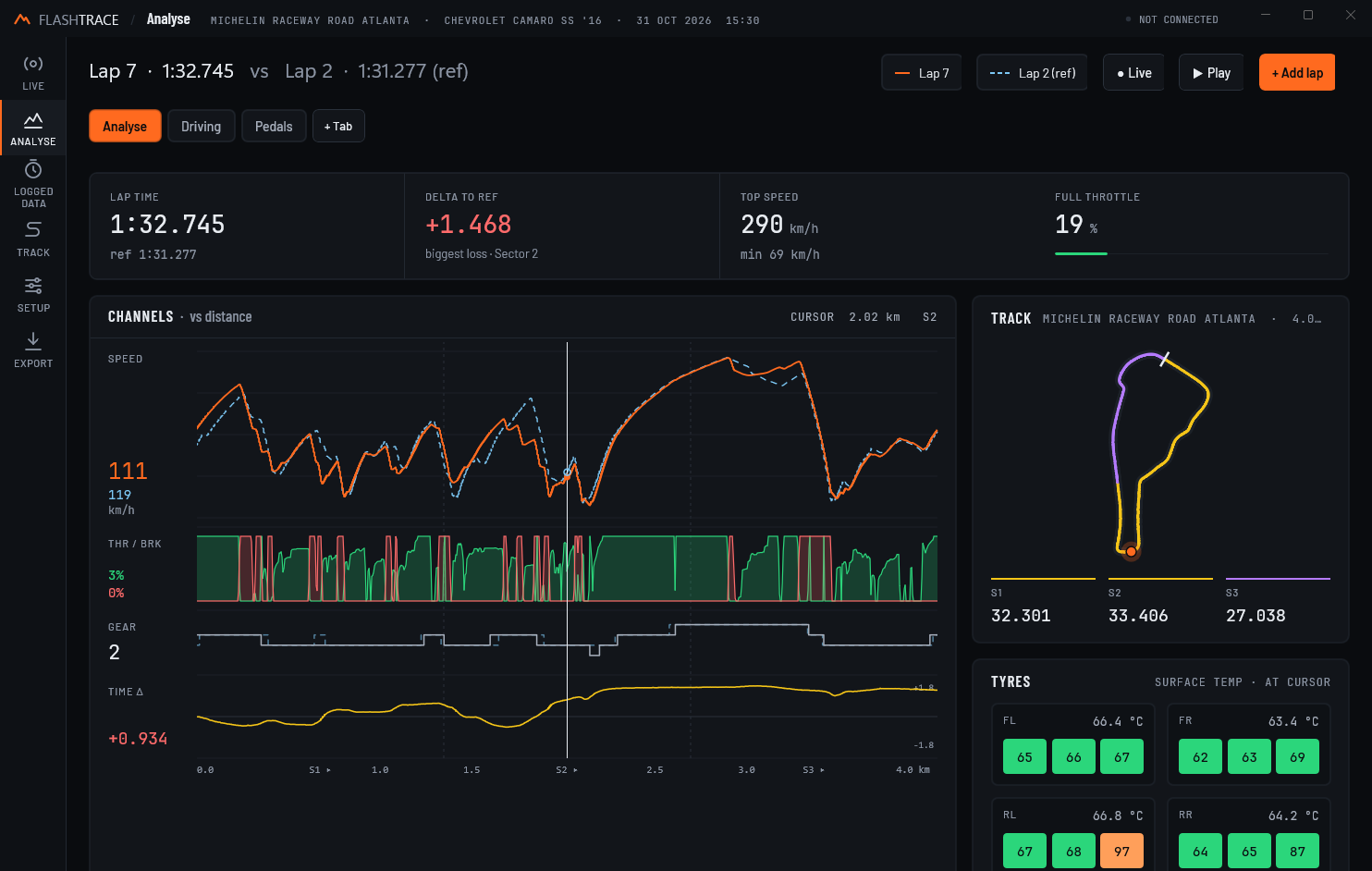
Open any lap and FlashTRACE puts it against a reference, your best on the same car and track unless you choose another. Every channel shares one distance axis and one cursor, so a lift on the throttle lines up with the speed it cost and the time it lost.

This lap Reference (dashed) Best on car & track Session best Time Δ
  • Lap time, delta to the reference and the sector where you lost most, top speed and full-throttle share at a glance
  • Speed, throttle and brake, gear and a running time delta, stacked on one distance axis
  • Drag the cursor and the car moves round the track map, with tyre temperatures at that point
  • Sector times coloured purple for your best ever and green for the best of the session
  • Play the lap back at 1×, 2× or 4×, or switch to Live and watch the current lap build against the reference
The Analyse screen comparing lap 7 (1:32.745) with lap 2 (1:31.277) at Road Atlanta: KPI tiles showing a 1.468 second deficit, mostly in sector 2; stacked speed, throttle and brake, gear and time delta traces with a cursor at 2.02 km; the track map coloured by sector; and tyre temperatures.

Custom charts

Your own workbook of charts.

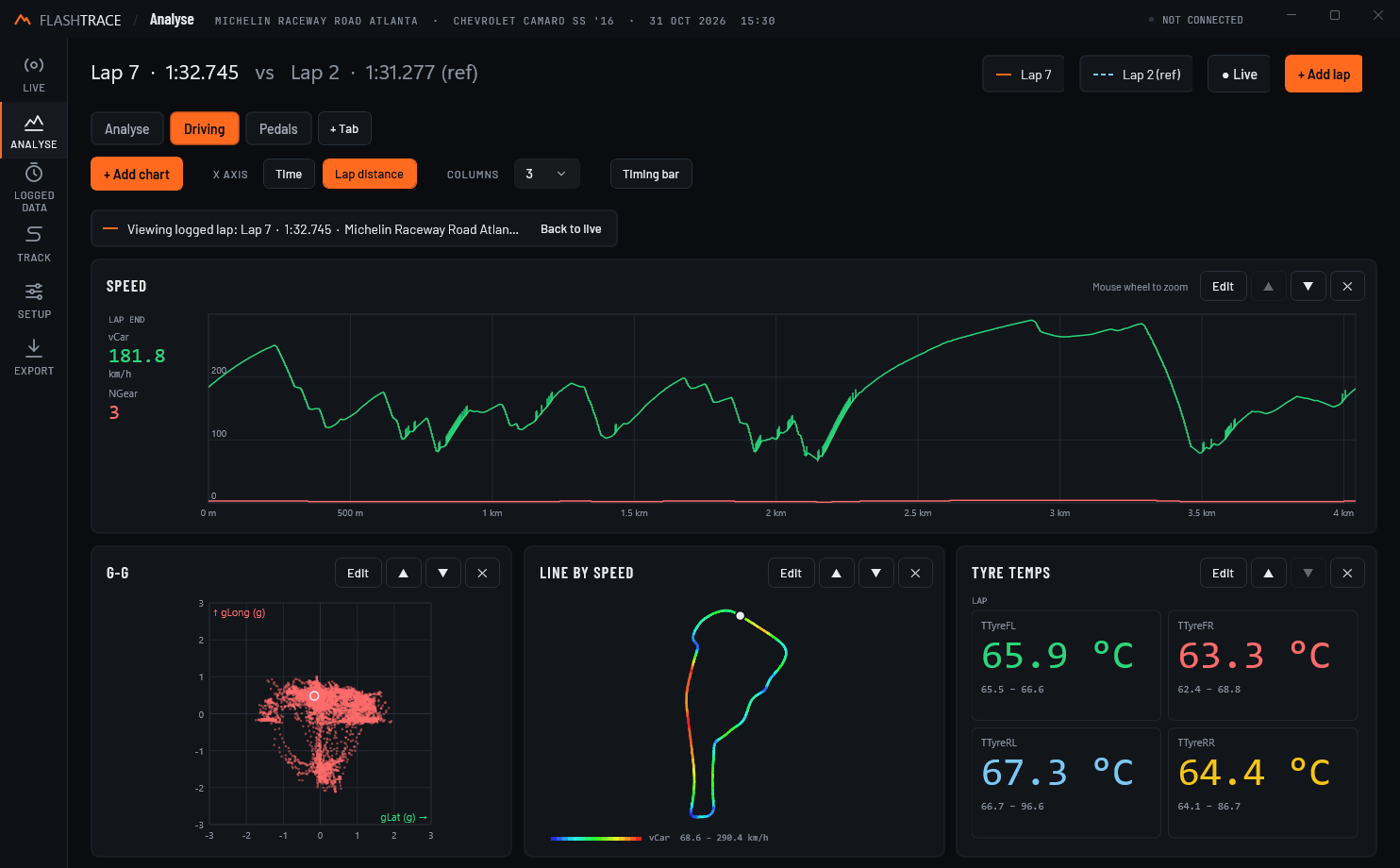
Next to the Analyse view, build tabs of your own charts for whatever you're working on: braking, tyre wear, fuel strategy, suspension. Each tab keeps its own charts and column layout.

  • Five chart types: line, big-number values, track map coloured by any channel, X–Y scatter (for a G-G diagram) and histogram
  • Plot against time or lap distance, and zoom with the mouse wheel or a pinch
  • A value column beside every chart shows the reading at the cursor
  • An optional timing bar: lap, lap time, delta, predicted, last, best and position
  • On Windows, Ctrl+1–9 jumps straight to a tab
A custom chart tab named Driving: a full-width speed chart against lap distance, a G-G scatter of lateral against longitudinal g, the racing line coloured by speed, and big-number tyre temperatures for each corner.

Logged data

Every lap, saved for you.

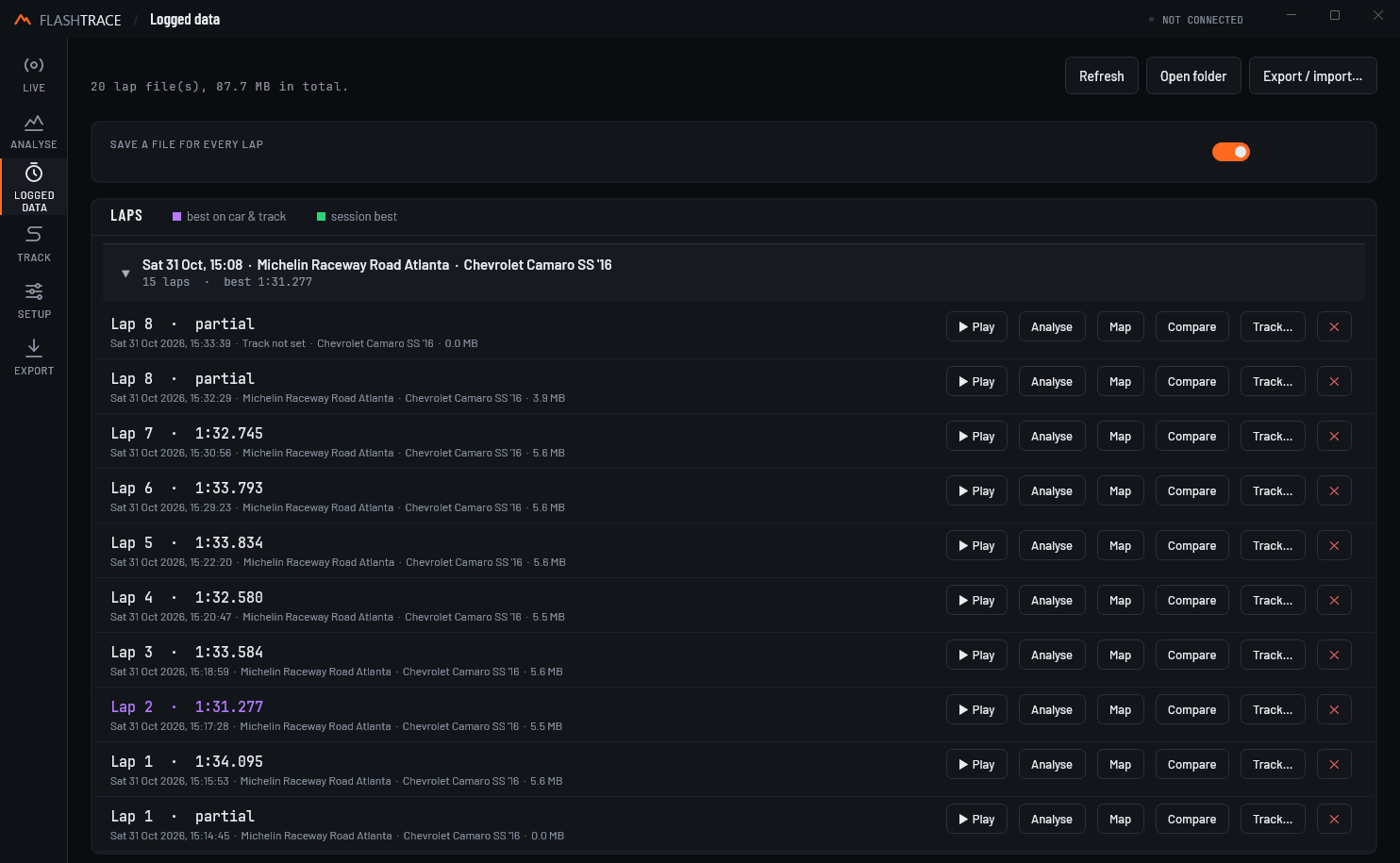
Switch logging on and FlashTRACE writes a file for every lap you drive, with every channel it receives and calculates. Laps are grouped into sessions by date, car and track, with your bests marked.

  • One CSV file per lap, ready for Excel or any other tool
  • Open a lap in Analyse, on the map, as a comparison, or replay it to the Live screen as if you were driving
  • Your best on each car and track in purple, the best of each session in green
  • Deleted a lap by mistake? Undo brings it back
  • Export laps as a zip and import them on another PC or phone
The Logged data screen: a session at Michelin Raceway Road Atlanta in a Chevrolet Camaro SS with 15 laps, the best, 1:31.277, in purple, and Play, Analyse, Map, Compare and Track buttons on each lap.
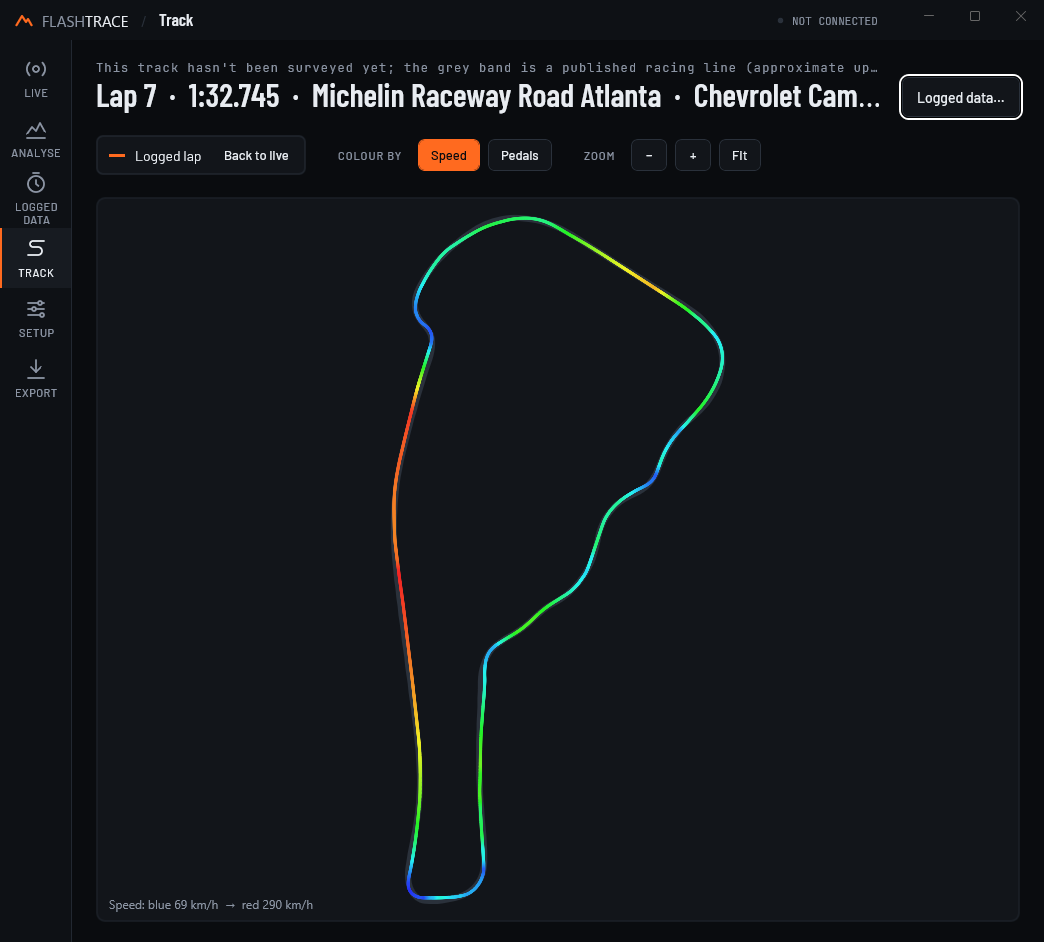
The Track screen: a lap of Michelin Raceway Road Atlanta drawn over the published racing line, coloured from blue at 69 km/h to red at 290 km/h.

Track

It knows where you are.

Gran Turismo 7 doesn't say which track you're on, so FlashTRACE works it out from the line you drive, often before you've finished a lap. Tracks it doesn't know are learned the first time you name them.

  • 113 layouts recognised automatically, drawn over published racing lines and, for some, surveyed track edges
  • Colour the line by speed or by pedals to see where you brake and where you're flat
  • Zoom, pan and follow the car, with a ghost of your reference lap

Channels

Write your own channels.

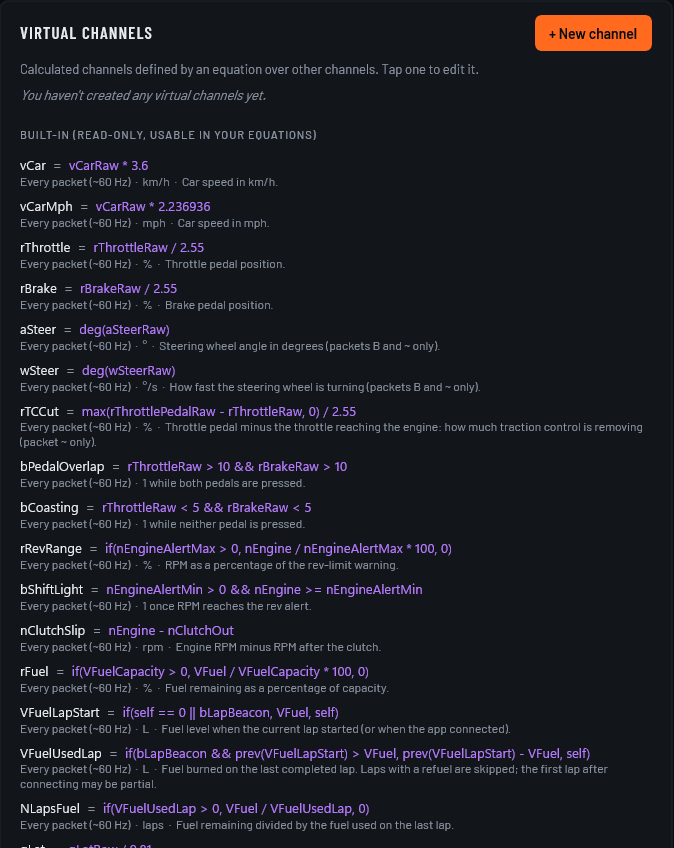
Every value the game sends becomes a named channel. On top of those, FlashTRACE calculates dozens more, and you can add your own with simple equations that update with every packet.

  • Built-in channels for g-forces, traction control cut, pedal overlap, coasting, fuel per lap, roll, pitch and damper speeds
  • Suspension travel measured from where each car sits at rest, learned for every car
  • Equations with if, prev, max, hypot and more, logged with every lap
  • Give any channel your own display name
The virtual channels list in Setup: built-in channels such as vCar = vCarRaw * 3.6, rTCCut, bPedalOverlap and VFuelUsedLap, each with its equation, units and a description.

And

The details that count.

Finds your PS5

Find PS5 searches your network for the console, so there's no IP address to type. Next time, FlashTRACE connects by itself when it opens.

Replay

Play any logged lap, and the rest of its session, back through the Live screen at 1×, 2× or 4×.

Real names

Cars and tracks are shown by name, from community-maintained lists you can refresh from inside the app.

Every field

Uses the game's extended packets for steering, motion and the fields most tools ignore, or the basic packets for older versions of GT7.

Private

No account and no tracking. Your laps are plain files on your own PC or phone.

PC and phone

The same app on Windows and Android: a nav rail and wide layouts on the desktop, a bottom bar and big readouts on the phone.

Set up

On track in three steps.

FlashTRACE listens to the telemetry Gran Turismo 7 already sends over your home network. There's nothing to install on the console.

  1. Same network

    Put your PC or phone on the same Wi-Fi or wired network as your PS5, and start Gran Turismo 7.

  2. Find PS5

    Open FlashTRACE and press Find PS5 in Setup. It finds the console and remembers it for next time.

  3. Drive

    Head out on track. The Live screen comes to life, and every lap is saved, ready to analyse when you pit.

Your data

Built like a pit wall.

Dark and calm, with colour saved for what matters: orange for your lap, dashed blue for the reference, green where you're gaining and red where you're losing. Every number is monospaced, so nothing jitters as it updates.